Skip to content

Today's spend limit

Plenty of room.

You know your credit limit. Now know your spend limit.

Ralphy works out what's yours to spend today, around every bill and paycheck still coming. Five seconds in the morning, then stop thinking about it.

iPhone, US banks · Two weeks free, then $3.99/month · Read-only: Ralphy can never move your money

01 Why this exists

Budgeting apps don't work.

Researchers randomized 9,035 people: some got a single spendable number, some got full categories, the rest got neither. Then they watched the spending. It didn't drop. Not for the one-number group, not for the category group. A budget you have to remember to follow is an easy one to stop following. If budgeting has never stuck for you, you have plenty of company.

What the study never tested was the watching. Nobody in any of the three groups had anything keeping an eye on what was coming between paychecks. That is what Ralphy does: it watches every bill, every card, every payday, and speaks up before the moment you'd have wanted to know.

Randomized controlled trial · Common Cents Lab and Irrational Labs, with Clarity Money · 2020 · n = 9,035

To everyone who's ever white-knuckled it to payday,

Most money advice assumes you have spare discipline, a taste for spreadsheets, and some savings already. I don't think that describes many people.

I built the first version of this for my partner, who wanted to budget without it becoming a second job. Reading bank transactions is what I do for a living, so I had a head start on the messy part.

Then I asked friends how they handled money. Some kept a spreadsheet and quietly hated it. The rest watched their credit card balance and kept it under a number they'd picked themselves. That second habit is the one worth noticing. A credit limit is the only spending number anyone ever hands you, so people end up budgeting against it. It tells you what the bank will allow. It says nothing about what you can afford.

Every year the Federal Reserve asks Americans whether they could cover a surprise $400 expense with cash. More than a third can't (Federal Reserve, 2025). I don't think that's a budgeting failure. It's what happens when money arrives in lumps, leaves in a hundred little pieces, and nobody is watching the road ahead for you.

Knowing what you can afford shouldn't take a finance degree or a fat paycheck. It should take five seconds. Check one number in the morning, then put your phone down and stop carrying the arithmetic around with you all day.

Ralphy is early, and you'll see it get better week by week.

Stephen, building Ralphy ๐Ÿฆ™

Read the master plan โ†’

02 How it works

The receipt

Every number shows its math.

This is the receipt behind a $40 morning. It's the same one the app opens when you tap the number.

A sample morning. In the app, every number (the spend limit, a bill, the low point) opens exactly like this, with yours. If one is ever wrong, correct it and Ralphy learns. You never have to take the number on faith.

Today's spend limit: how it's made

Checking, this morning$1,790
Your buffer (kept where it is)โˆ’$400
Spendable cash$1,390
Rent (lands Wednesday)โˆ’$950
T-Mobile (Friday)โˆ’$143
Visa minimum (due Monday)โˆ’$57
Left for the days ahead$240
The six days to paydayรท 6
Today's spend limit$40

That first line is every account, not one.

Connect your checking, your savings and your credit cards throughPlaid and Ralphy reads them together: the balances you can actually spend from, the card balances you owe, and every bill and paycheck moving between them. A spend limit built on one account is a guess about the others. This is not a net-worth dashboard and it doesn't track investments. It is the whole picture of the money that moves, which is the part the number depends on.

The app

Three mornings with Ralphy.

The whole app is one glance a day. Here is how that glance changes. Or try a morning yourself: it runs in the browser, with no download and no bank.

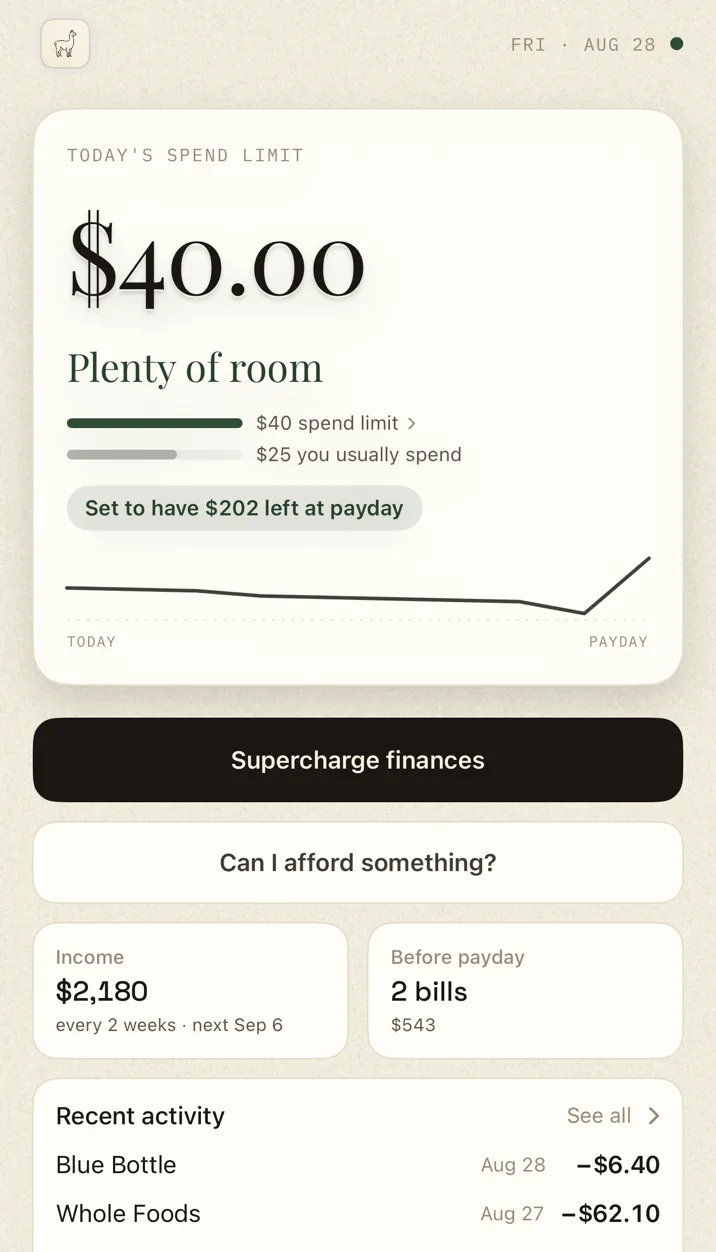
The Ralphy app on a clear week: today's spend limit is $40 with the verdict 'Plenty of room', a bar comparing it to the $25 you usually spend, and the note 'Set to have $202 left at payday'.

01 · A clear week

One honest number, worked out before you wake. See something you want? Ask "Can I afford something?" The answer is what it does to your week.

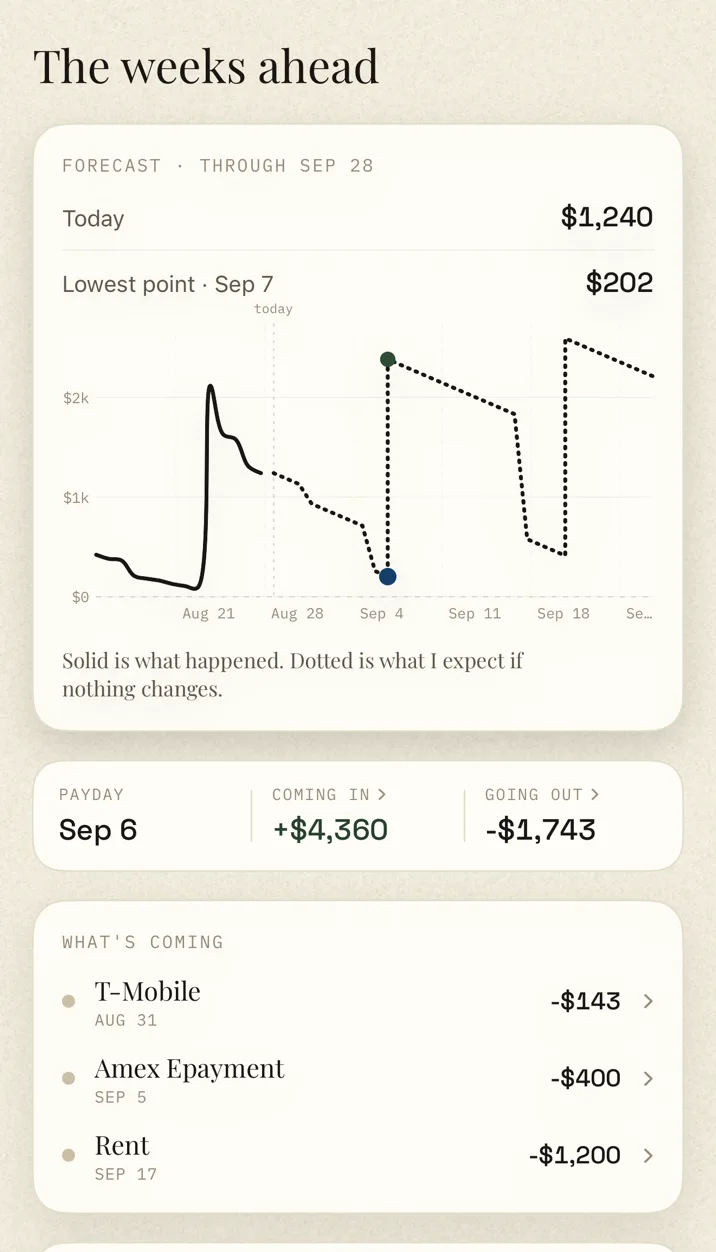
Ralphy's Ahead screen: a forecast through the next payday with today at $1,240, the lowest point marked at $202 on Sep 7, and upcoming bills listed with their dates.

02 · The weeks ahead

Bills and card due dates sit in the forecast, so the low point is spotted before it arrives. In the app's own words: "Solid is what happened. Dotted is what I expect if nothing changes."

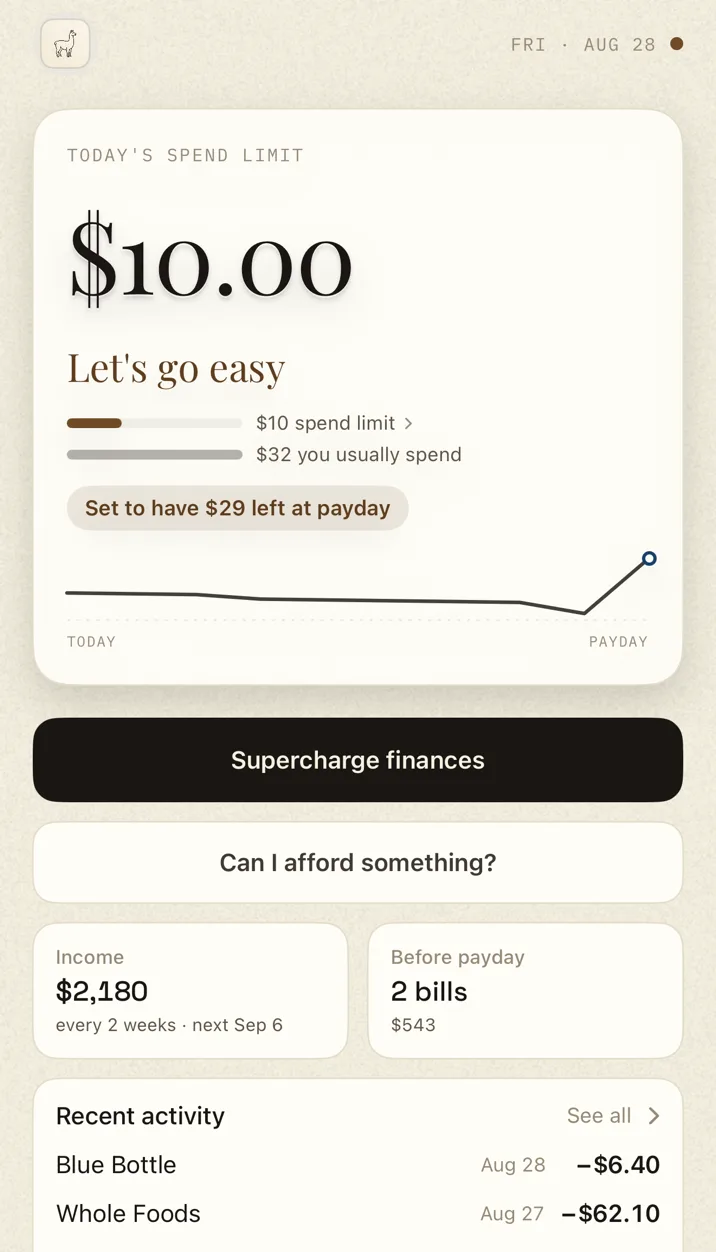
The Ralphy app in a careful week: the verdict reads 'Let's go easy' with a trimmed $10 spend limit and the note 'Set to have $29 left at payday'.

03 · A careful week

Some weeks are just tight. Ralphy sees them coming, trims the number, and tells you why. It's a heads-up and that's all.

The rest of the time

Most days you don't open it.

A money app you have to remember to check is one more thing to remember. Ralphy watches the week and tells you when something has changed. The rest of the time it sits on your home screen with today's number on it.

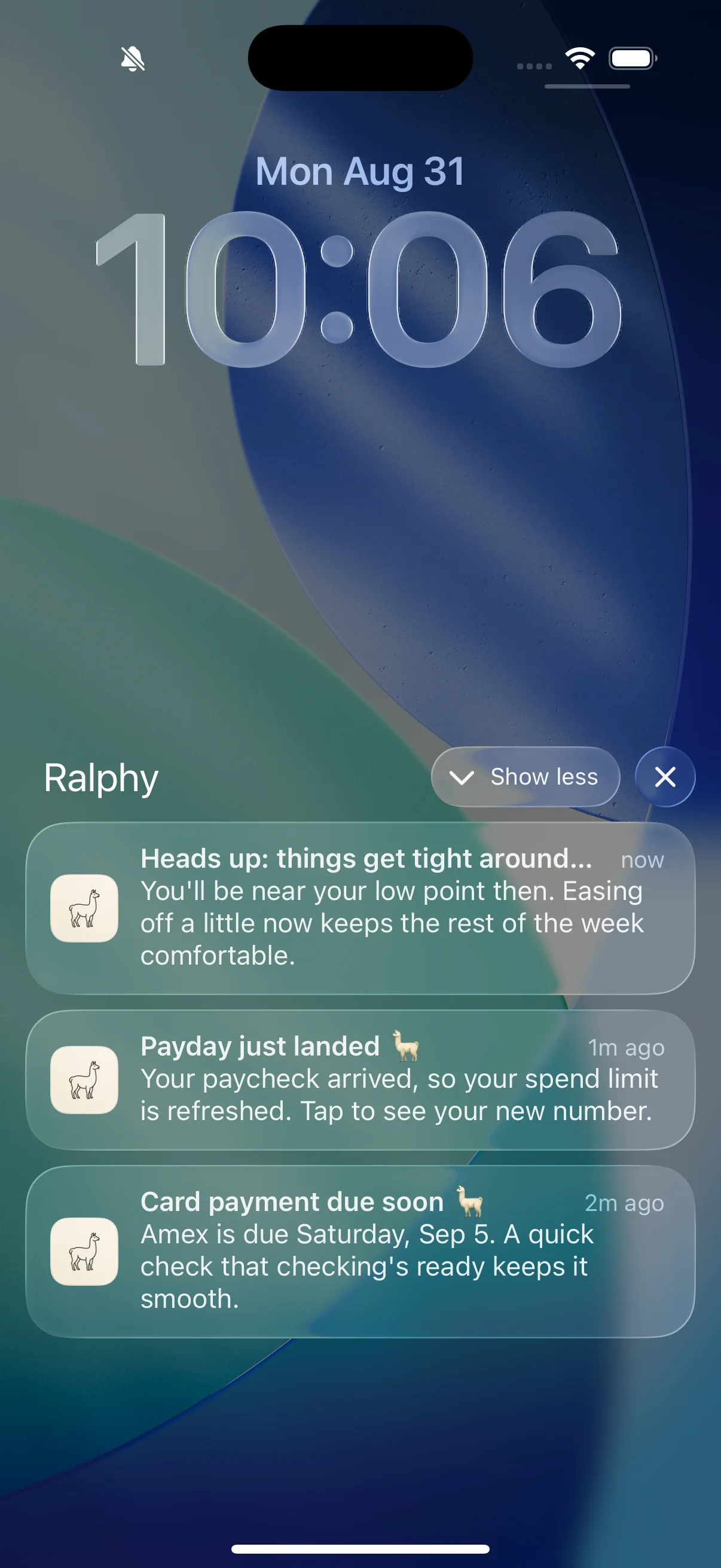
A real iPhone lock screen, Monday August 31: Ralphy's notification group expanded, showing the heads-up 'things get tight' from moments ago, 'Payday just landed', and a card payment reminder due Saturday.

It tells you before you'd have asked.

The heads-up lands the morning before a tight stretch, while there's still time to go easy. When a bill clears you get a note, so a smaller balance is never a surprise. A card payment gets a nudge before it's due. And when you reach payday with room to spare, it says that too.

And when you do glance, it's already there.

The widget carries today's number and what the day has taken out of it, so checking costs you a look rather than a tap.

None of it lands unless you ask for it.

Every one of these is opt-in, and you pick the hour they land. The ones scheduled on your phone can name a figure, because the figure never leaves the device. The ones that travel over the network deliberately carry no amounts at all, only that something is worth a look. Try the number yourself →

03 What you can trust

What Ralphy can't do.

A trust badge is easy to put on a website. Each of these is checkable instead.

Move your money.
Ralphy is read-only, end to end. It holds no transfer permissions. And the spend limit is advice: it never stands between you and your card.
See your bank password.
You sign in at your bank, with your bank, through Plaid. Ralphy receives a read-only connection, never your credentials.
Keep what you delete.
Delete your account in one tap and everything goes with it. It isn't archived, and it isn't anonymised and kept around.
Make money any other way.
Your subscription is the only way Ralphy makes money. No ads, no data sold, no kickbacks from anyone.

Built on

The short answers.

Does Ralphy move my money?
No. Ralphy is read-only. It reads your accounts to do its math, and the buffer it tracks is never transferred out of your account. Nothing is ever charged, moved, or held on your behalf.
Do I have to connect a bank?
Yes. Ralphy forecasts your real money, so it needs your real transactions to work out what's due and when you're paid. You connect securely through Plaid (Ralphy never sees your bank password), and you can still log cash purchases by hand once you're set up.
Which banks can I connect?
Most US banks and credit unions, plus cards and fintechs like Venmo and Robinhood, securely through Plaid. You enter your credentials with Plaid directly, and Ralphy never sees them.
Is my data safe?
Yes. You sign in at your bank, through Plaid, and Ralphy never sees your password. You sign in to Ralphy with Apple, so there's no Ralphy password to lose either. Everything is encrypted in transit and at rest, and deleting your account deletes everything in it. What Ralphy does with your data has the specifics, including the things Ralphy can't do.
Who's behind Ralphy?
Stephen, building it on my own. For six years I've built machine learning models on bank transaction data for lenders and insurers, which is the same problem underneath Ralphy: what a charge really is, which deposit is a paycheck, what will happen again next month. Support goes to [email protected], and I answer it.
How much does it cost?
Ralphy is $3.99/month after a two-week free trial. One plan, everything included, billed through your Apple ID and cancellable anytime. That's less than a single overdraft fee, and catching one bad week pays for the year.
How does it compare to YNAB, Monarch, or Copilot?
Ralphy is deliberately smaller: one number a day instead of a dashboard, for about half what the big ones charge. I've written an honest comparison of each, including the places they beat Ralphy and the cases where you should buy theirs instead. Read the comparisons.
When does it launch?
Soon, on iPhone. The TestFlight beta is open now, capped at twenty-five, and you can join it today without waiting for an invite. Leave your email and I'll write on launch day, or when a seat frees up.

04 What it costs

3.99/month

Two weeks free first. One plan, everything in it.

  • Billed through your Apple ID. Cancel in Settings, like any subscription.
  • No annual tier, no "Pro", nothing extra to buy inside.
  • Less than a single overdraft fee. If Ralphy doesn't save you more than it costs, it isn't doing its job.

The beta is open. Twenty-five seats.

It runs on TestFlight before it reaches the App Store: real banks, real paydays. I read every reply.

  1. Take a seat. There are twenty-five, and the button below opens TestFlight straight away. While they last, there is no invite to wait for.
  2. Connect a US bank. Ralphy reads it read-only through Plaid, which reaches US banks only, and your number is ready by the morning.
  3. Tell me where it's wrong. Wake up to the spend limit, push back on it, and I'll fix what you find. That's the whole job.
Join the beta on TestFlightor leave your email and Iโ€™ll hold your place:

Free while it's a beta. TestFlight never charges, and the two-week trial only starts at launch. Bring an iPhone and a US bank. One click in any email takes you off the list for good.